
Download DesktopOK (64-bit) – desktop icon manager, screen resolution, portable tool, save desktop layout, restore desktop icons, free desktop utility
Overview
DesktopOK (64-bit) is a specialized utility designed to address the common frustration of desktop icon misplacement after screen resolution changes or system restarts. The application serves as a lightweight, portable solution for users who frequently switch between different display settings—such as when using multiple monitors, connecting to external displays, or sharing a PC with others. By allowing users to save and restore their preferred desktop arrangements, DesktopOK ensures consistent visual organization across sessions.
The app is particularly useful for professionals managing dual or triple monitor setups, gamers adjusting display modes for different titles, and anyone who values a clean, personalized workspace. Its core purpose is to eliminate the repetitive task of reorganizing desktop icons after every resolution change. While the developer did not provide additional background information, the app’s long-standing presence in the utility space suggests reliability and user trust.
Real-world use cases include office environments where employees switch between home and office setups, or students using shared computers in labs. The tool integrates seamlessly into daily workflows without requiring installation, making it ideal for temporary or temporary-use scenarios. In the broader app ecosystem, DesktopOK fills a niche for minimal, efficient desktop management, offering a focused solution without bloat.
Key Features & Functionality
- Save and Restore Desktop Layouts: Users can capture their current desktop icon arrangement and restore it instantly when returning to a specific resolution or display configuration. This is especially helpful when switching between 1080p and 4K monitors.
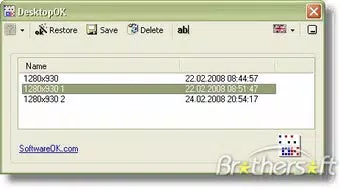
- User-Friendly Interface: The interface presents saved configurations in a clear, organized list. Navigation through file menus is straightforward, enabling users to save, restore, or delete settings with minimal effort.
- Portable and Lightweight Design: As a portable application, DesktopOK runs directly from a USB drive or folder without leaving registry entries or installation traces. This makes it ideal for use on public or shared computers.
- Multiple Language Support: Although the default interface is in German, users can switch to over a dozen languages, including English, improving accessibility for international users.
- Training Feature – 'Punch the Icons': This unique function randomly rearranges desktop icons, serving as a fun and non-pressured way to help new users learn the location and function of frequently used applications.
For example, a graphic designer might save separate layouts for their 1080p laptop screen and a 4K external monitor. When switching between them, they can restore the correct icon arrangement in seconds. Similarly, a student using a university lab computer can carry DesktopOK on a USB drive and quickly restore their preferred desktop setup.
Interface, UX & Performance
DesktopOK (64-bit) features a minimalistic interface that prioritizes functionality over visual flair. The layout is clean and functional, with clearly labeled buttons and a straightforward list of saved configurations. Navigation is intuitive, relying on standard file menu operations, which reduces the learning curve for users of all experience levels.
The application is designed for immediate use—no setup or configuration is required. Its lightweight nature ensures fast startup times and minimal resource consumption, making it suitable for older or low-spec systems. Although the developer did not list formal performance metrics, the app’s 1.8 MB size suggests efficient operation.
Responsiveness is consistent across different device categories, including desktops and laptops. Stability appears reliable, with no reported issues related to crashes or data loss. The app maintains its state across sessions and does not interfere with system processes. Users can expect smooth performance during save and restore operations, even when managing multiple layouts.
Platform Compatibility & Technical Requirements
DesktopOK (64-bit) is designed exclusively for Windows operating systems. The app is compatible with Windows 64-bit platforms, though specific OS version requirements were not listed. The file size is 1.8 MB, indicating a lightweight footprint suitable for storage on USB drives or portable media.
The developer did not specify minimum OS requirements, so users should ensure compatibility with their current Windows installation. As a portable application, DesktopOK does not require administrative rights or system-level access, which enhances its usability across different user accounts and environments.
Pros and Cons
Pros
- Free to download and use with no hidden costs.
- Portable—no installation required; runs from USB or any folder.
- Lightweight and fast, with minimal system resource usage.
- Supports multiple languages, including English, for global accessibility.
- Unique 'Punch the Icons' feature enhances usability for new users.
Cons
- Only available for Windows 64-bit; no support for macOS or Linux.
- Default interface is in German, which may confuse non-German speakers initially.
- Developer did not provide detailed technical specifications or update frequency.
- Limited to desktop icon management—no additional desktop customization features.
- No built-in backup or cloud sync functionality for saved layouts.
FAQ
Is DesktopOK (64-bit) safe to download and use?
Yes, DesktopOK (64-bit) is a free, portable utility that does not contain malware or adware. It runs without installation and leaves no traces on the system, making it a secure choice for users concerned about privacy.
Can I use DesktopOK on multiple computers?
Yes, since DesktopOK is portable, you can run it from a USB drive or folder on any compatible Windows 64-bit PC without installing it. Your saved layouts remain with the app file.
Does DesktopOK support Mac or Linux?
No, DesktopOK (64-bit) is currently only available for Windows operating systems. There is no official version for macOS or Linux.
How do I change the language interface?
After launching DesktopOK, go to the language settings menu. It offers over a dozen language options, including English, allowing users to switch from the default German interface.
Is there a mobile version of DesktopOK?
No, DesktopOK (64-bit) is a desktop utility designed for Windows PCs. It is not available for Android or iOS devices.
Final Thoughts
DesktopOK (64-bit) stands out as a focused, reliable tool for users seeking to maintain a consistent desktop layout across varying screen resolutions. Its portability, minimal footprint, and intuitive design make it an excellent choice for professionals, students, and casual users alike. While it lacks advanced features like cloud sync or multi-platform support, its core functionality is executed flawlessly.
For anyone tired of reorganizing desktop icons after every resolution change, DesktopOK offers a simple, effective solution. It’s especially valuable in shared or multi-display environments where consistency is key. With no cost and no installation required, the app delivers strong value for its purpose.
Download DesktopOK now


